Enabling Analysis Mode
- In the budget sheet, click the Change button in the Filters toolbar.
The setup page for the selected filter is displayed.
- Click on the View tab.
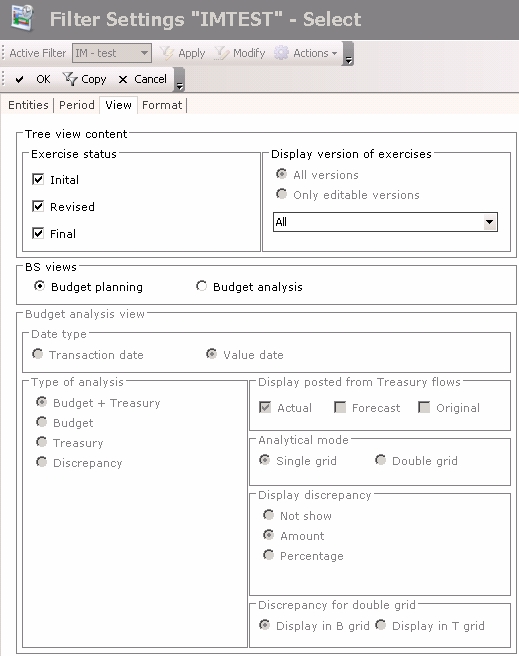
- In the BS views area, select the Budget Analysis option.
The fields of the area (specific to the budget analysis) are enabled. - Enter the budget analysis settings.
 View Settings Description
| Field | Description |
|---|---|
| Date Type area | |
| Transaction Date | Enable this option to launch the comparison with the Flows transaction dates saved in the Cash module. |
| Value Date | Enable this option to launch the comparison with the Flows value dates saved in the Cash module. This option is selected by default. |
| Type of analysis area | |
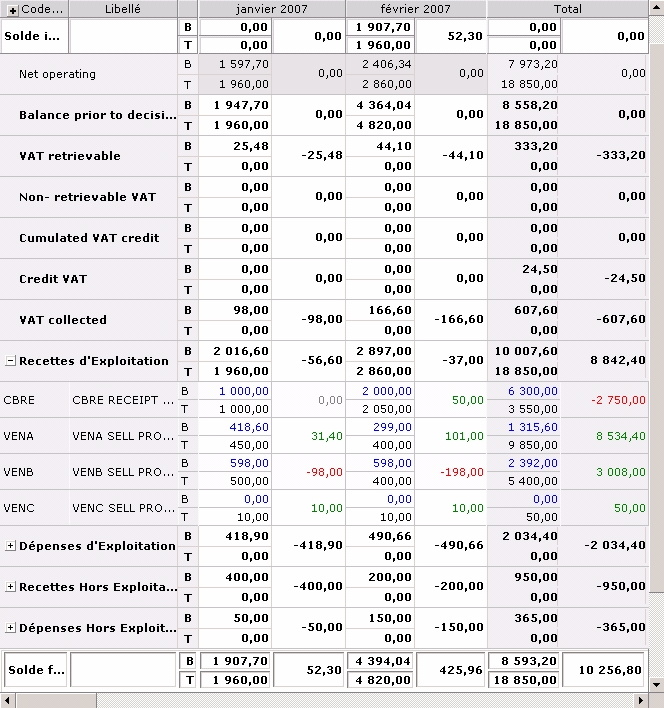
| Budget + Treasury | Enable this option to display amounts from the Treasury Budget and amounts of the flows saved in the Cash module in front of the discrepancy. |
| Budget | Enable this option button to display only amounts from the Treasury Budget in front of the discrepancy. |
| Treasury | Enable this option button to display only the amounts of the flows saved in the Cash module, in front of the discrepancy. |
| Discrepancy | Enable this option to display the discrepancy only. |
| Posted from Treasury flows field This area enables the selection of statuses for the flows saved in Cash that you want to include in the analysis. You can select several statuses. |
|
| Actual | Enable this option to include the flows with the "Actual" status from the Cash module. This option is the only one to be selected by default in this area. |
| Forecast | Enable this option to include the flows with the "Confirmed Forecast" status from the Cash module. |
| Origin | Enable this option to include the flows with the "Initial Forecast" status in the Cash module (they are unconfirmed flows forecasts). |
| Budget Analysis View area This area is available if you chose to display the Treasury Budget and the flows saved in the Cashmodule. It enables you to select the display mode of both sheets. |
|
| Single Grid | Enable this option to display a single sheet. The Treasury Budget amounts are displayed on the first line called B, and the amounts of the flows saved in the Cash module are displayed on the second line called T. View Example of Single Grid |
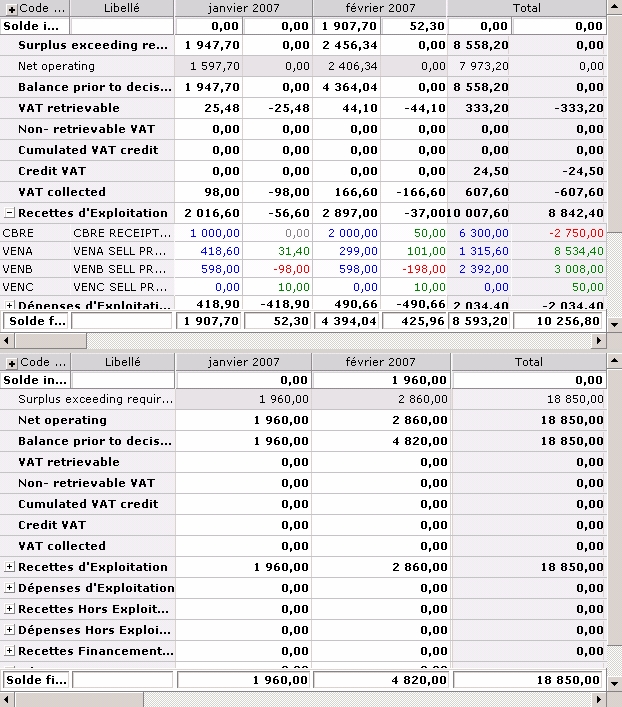
| Double Grid | Enable this option to display two budget sheets: the Treasury Budget Sheet on top, and the flows saved in the Cash module in another sheet, at the bottom of the page. View Example of Double Grid |
| Display Discrepancy area | |
| Not show | Enable this option not to display the discrepancy between the Treasury Budget and the flows saved in the Cash module. You cannot enable this option if you chose to display the discrepancy only, i.e. that the Discrepancy option is enabled in the Type of analysis area. |
| Amount | Enable this option to display the discrepancy amount between the Treasury Budget and the flows saved in the Cash module. The discrepancy amount is displayed in the column on the right of the forecast amounts column. |
| Percentage | Enable this option to display the discrepancy percentage between the Treasury Budget and the flows saved in the Cash module. The discrepancy percentage is displayed in the column on the right of the forecast amounts column. |
| Discrepancy for Double Grid area This area is enabled if you chose to display the double grid. It enables you to specify the location of the discrepancy. |
|
| Display in B Grid | Enable this option to display the discrepancy in the Treasury Budget. |
| Display in T Grid | Enable this option to display the discrepancy in the sheet of the flows saved in the Cash module. |
Once you completed the modifcations, in the action bar at the top of the page, click:
- Save to save your modifications without leaving the current page,
- OK to save your modifications and go back to the previous page,
- Cancel to cancel your modifications and go back to the previous page.